
Flexcil APK – PDF વાંચવા અને Digital Notes બનાવવા માટે ઉપયોગી એપ
September 9, 2026
135.9 MB
1.5.0.10
Android 8.0+
1M+

Description
આજના સમયમાં વિદ્યાર્થીઓ અને અન્ય users પોતાના mobile અથવા tabletમાં books, notes અને study material રાખવાનું પસંદ કરે છે. ખાસ કરીને PDF books અને digital documents સાથે કામ કરતી વખતે એવી app ઉપયોગી બને છે જેમાં PDF વાંચવાની સાથે notes પણ બનાવી શકાય.
જો PDF વાંચવા અને notes બનાવવા માટે અલગ અલગ appsનો ઉપયોગ કરવો પડે તો વારંવાર apps વચ્ચે switch કરવું પડે છે.
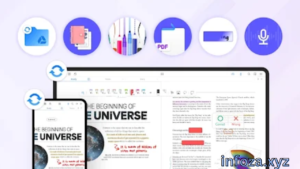
Flexcil APK Android ફોન અથવા tabletમાં Flexcil appનો ઉપયોગ કરવા માટેની APK ફાઇલ તરીકે સમજવામાં આવી શકે છે. Flexcil એક note-taking અને PDF reader app છે. તેની મદદથી તમે PDF documents વાંચી શકો છો, important text highlight કરી શકો છો, annotations કરી શકો છો અને સાથે સાથે digital notes બનાવી શકો છો.
આ app ખાસ કરીને students, teachers, researchers અને digital note-taking પસંદ કરતા users માટે ઉપયોગી બની શકે છે.
આ લેખમાં આપણે Flexcil APK વિશે સરળ ગુજરાતી ભાષામાં જાણીશું.

📋 Flexcil APKની મૂળભૂત માહિતી
| માહિતીવિગતો | |
|---|---|
| App Name | Flexcil |
| Platform | Android |
| Category | Productivity / Education |
| Developer | Flexcil Inc. |
| મુખ્ય ઉપયોગ | PDF Reading અને Note-Taking |
| PDF files વાંચી અને annotate કરી શકાય છે | |
| Notes | Digital notes બનાવી શકાય છે |
| Highlight | Important text highlight કરી શકાય છે |
| Handwriting | Pen અને handwriting features ઉપલબ્ધ છે |
| Cloud Sync | Supported cloud sync features ઉપલબ્ધ છે |
| Official Source | Google Play Store |
આ માહિતીથી તમને Flexcil appને સમજવામાં સરળતા રહેશે. તેના features version અને plan પ્રમાણે અલગ હોઈ શકે છે.
🌟 Flexcil APK શું છે?
Flexcil APK Android ફોન અથવા tabletમાં Flexcil app ઇન્સ્ટોલ કરવા માટે ઉપયોગમાં લેવાતી APK ફાઇલ તરીકે ઓળખી શકાય છે.
APKનો અર્થ Android Package Kit છે. Androidમાં apps ઇન્સ્ટોલ કરવા માટે APK ફાઇલનો ઉપયોગ થઈ શકે છે.
Flexcilનો મુખ્ય હેતુ PDF વાંચવા અને તેની સાથે digital notes બનાવવાનો છે. તમે PDFમાં કોઈ important paragraphને highlight કરી શકો છો અને જરૂરી informationને પોતાના notesમાં પણ લઈ જઈ શકો છો.
ઉદાહરણ તરીકે, કોઈ વિદ્યાર્થી PDF textbook વાંચતી વખતે important points highlight કરી શકે છે અને સાથે અલગ notebookમાં પોતાના study notes બનાવી શકે છે.
📱 Flexcilનો પરિચય
Flexcilને એક digital study toolkit જેવી એપ કહી શકાય છે. તેમાં PDF reader અને note-taking features એક સાથે આપવામાં આવ્યા છે.
વિદ્યાર્થી તેનો ઉપયોગ textbooks અને study material માટે કરી શકે છે. Teacher lesson material સાથે notes બનાવી શકે છે અને researcher PDF documentsમાંથી મહત્વની informationને organize કરી શકે છે.
Flexcilમાં PDF અને notes સાથે કામ કરવા માટે gestures, annotation tools અને handwriting features ઉપલબ્ધ છે.
🛠️ Flexcil APKનો ઉપયોગ કેવી રીતે કરવો?
Flexcilનો ઉપયોગ કરવો ખૂબ મુશ્કેલ નથી.
સૌથી પહેલા Android ફોન અથવા tabletમાં Flexcilની official app ઇન્સ્ટોલ કરો.
હવે તમે તમારા deviceમાં રહેલી PDF file open કરી શકો છો. PDF વાંચતી વખતે જરૂરી textને highlight અથવા underline કરી શકાય છે.
જો તમે અલગ notes બનાવવા માંગતા હોવ તો notebook બનાવી તેમાં handwriting અથવા text દ્વારા information લખી શકો છો.
Flexcilમાં PDF અને notesને સાથે ઉપયોગ કરવાની સુવિધા હોવાથી study દરમિયાન વારંવાર બીજી app ખોલવાની જરૂર ઓછી થઈ શકે છે.
શરૂઆતમાં basic PDF reading અને highlightingથી શરૂઆત કરવી સારી છે. App સમજાઈ જાય પછી gestures, annotations અને બીજા available featuresનો ઉપયોગ કરી શકાય છે.
✨ Flexcilની મુખ્ય સુવિધાઓ
Flexcilમાં ઘણા ઉપયોગી features છે.
📄 PDF Files વાંચવી
તમે Android deviceમાં PDF documents open કરીને વાંચી શકો છો.
🖍️ PDF Highlight કરવું
Study materialમાં important textને highlight અથવા underline કરી શકાય છે.
✏️ Handwritten Notes
Pen અને handwriting toolsની મદદથી digital notes બનાવી શકાય છે.
📝 Digital Notebook
PDF વાંચતી વખતે અલગ notebookમાં તમારા પોતાના notes બનાવી શકાય છે.
🔗 Reference Links
PDFમાંથી લેવામાં આવેલી information અને notes વચ્ચે reference links બનાવવામાં મદદ મળે છે, જેથી original source સુધી પાછા જઈ શકાય.
🎙️ Audio Recording
Available features દ્વારા class અથવા meeting દરમિયાન audio record કરીને notes સાથે તેનો ઉપયોગ કરી શકાય છે.
☁️ Cloud Sync
Supported cloud sync featuresની મદદથી notesને અલગ devices પર access અને synchronize કરી શકાય છે.
🤖 Flexcil AI
નવી versionsમાં Flexcil AI feature ઉપલબ્ધ છે, જેના દ્વારા documents સાથે રહીને summary અને questions જેવા AI-based કામો કરી શકાય છે.
📌 Flexcilનો અલગ અલગ કામ માટે ઉપયોગ
Flexcilનો ઉપયોગ માત્ર students માટે જ કરવો જરૂરી નથી.
| ઉપયોગ | Flexcilમાં શું કરી શકાય? |
|---|---|
| 📚 અભ્યાસ | PDF books વાંચવી અને notes બનાવવા |
| 🎓 Students | Lecture અને study notes ગોઠવવા |
| 👨🏫 Teachers | Teaching material પર annotations કરવા |
| 🔬 Research | Research PDFs વાંચવા અને important points save કરવા |
| ✍️ Writing | Digital handwritten notes બનાવવા |
| 📖 Reading | PDF books અને documents વાંચવા |
| 📋 Planning | Digital planner અને notesનો ઉપયોગ કરવા |
આ રીતે PDF અને notes સાથે કામ કરતા users માટે Flexcil એક useful option બની શકે છે.
✅ Flexcil APKના ફાયદા
Flexcilના ઘણા ફાયદા છે:
- PDF files વાંચી શકાય છે.
- PDFમાં important text highlight કરી શકાય છે.
- Digital handwritten notes બનાવી શકાય છે.
- PDF અને notesને સાથે ઉપયોગ કરી શકાય છે.
- Students માટે study material organize કરવામાં મદદ કરે છે.
- Research documents સાથે કામ કરી શકાય છે.
- અલગ અલગ foldersમાં documents અને notes ગોઠવી શકાય છે.
- Audio recording feature ઉપલબ્ધ છે.
- Cloud sync features ઉપલબ્ધ છે.
- કેટલાક versionsમાં AI features પણ ઉપલબ્ધ છે.
⚠️ Flexcil APKના નુકસાન
Flexcil ઉપયોગી છે, પરંતુ તેમાં કેટલીક મર્યાદાઓ પણ હોઈ શકે છે.
- નવા userને શરૂઆતમાં gestures અને કેટલાક features સમજવામાં સમય લાગી શકે છે.
- કેટલાક advanced features માટે paid plan અથવા in-app purchaseની જરૂર પડી શકે છે.
- મોટી PDF files deviceમાં વધુ storage લઈ શકે છે.
- Cloud અને કેટલીક online features માટે internet connection ضروری હોઈ શકે છે.
- બધા features દરેક device પર એકસરખા ઉપલબ્ધ હોય તે જરૂરી નથી.
- અજાણી website પરથી APK મેળવવી સુરક્ષિત ન પણ હોય.
💬 યુઝર્સના અનુભવો
Flexcilનો ઉપયોગ અલગ અલગ લોકો પોતાની જરૂરિયાત પ્રમાણે કરે છે. Students તેનો ઉપયોગ PDF textbooks અને study notes માટે કરી શકે છે, જ્યારે researchers અને teachers documents પર annotations અને notes માટે તેનો ઉપયોગ કરી શકે છે.
નવા userને શરૂઆતમાં gestures અને note-taking tools સમજવામાં થોડો સમય લાગી શકે છે. પરંતુ simple PDF open કરીને highlight અને basic notesથી શરૂઆત કરવામાં app સમજવી સરળ બની શકે છે.
જે usersને PDF વાંચવાની સાથે notes બનાવવાનું પસંદ છે તેમના માટે Flexcil ઉપયોગી બની શકે છે.
આથી Flexcilનો અનુભવ દરેક વ્યક્તિની જરૂરિયાત, device અને ઉપયોગ પર આધાર રાખે છે.
🔄 Flexcilના વિકલ્પો
જો તમે Flexcilનો ઉપયોગ કરવા માંગતા ન હોવ તો PDF અને note-taking માટે બીજી apps પણ ઉપલબ્ધ છે.
Adobe Acrobat Reader PDF files વાંચવા અને document-related કામો માટે ઉપયોગી option છે.
Xodo PDF PDF reading, annotation અને document management માટે ઉપયોગ કરી શકાય છે.
Goodnotes digital handwritten notes અને study માટે જાણીતું option છે.
Microsoft OneNote notes, writing અને study material ગોઠવવા માટે ઉપયોગી છે.
જો તમને ખાસ કરીને PDF સાથે handwritten notes બનાવવાના હોય તો Flexcil ઉપયોગી બની શકે છે. જો તમને માત્ર PDF reading જોઈએ તો simple PDF reader પણ પૂરતું હોઈ શકે છે.
🔒 Flexcil APKની સુરક્ષા અને પ્રાઇવસી
Flexcil APK ઇન્સ્ટોલ કરતી વખતે તેનો source ખૂબ મહત્વનો છે.
Internet પર ઘણી websites APK files આપે છે, પરંતુ દરેક website વિશ્વસનીય હોય તે જરૂરી નથી. કેટલીક અજાણી APK filesમાં unwanted અથવા harmful software હોઈ શકે છે.
તેથી Flexcilની official Android app માટે Google Play Store જેવા trusted sourceનો ઉપયોગ કરવો વધુ સારું છે.
તમારો account password કોઈની સાથે share ન કરો. કોઈ app permission માંગે ત્યારે તેને ધ્યાનથી તપાસો.
જો તમે private study material અથવા personal documents રાખતા હોવ તો તેમને અજાણી websites અથવા appsમાં upload કરતાં પહેલાં સાવચેત રહો.
તમારા Android deviceને પણ સમયસર update રાખો જેથી security સારી રહે.
❓ Flexcil APK વિશે સામાન્ય પ્રશ્નો
Flexcil APK શું છે?
Flexcil APK Android deviceમાં Flexcil app ઇન્સ્ટોલ કરવા માટે ઉપયોગમાં લેવાતી APK fileને કહી શકાય છે.
Flexcilનો ઉપયોગ શેના માટે થાય છે?
Flexcilનો ઉપયોગ PDF files વાંચવા, annotate કરવા, highlight કરવા અને digital notes બનાવવા માટે થઈ શકે છે.
શું Flexcil Androidમાં ચાલે છે?
હા, Flexcilની Android app ઉપલબ્ધ છે અને compatible Android devicesમાં તેનો ઉપયોગ કરી શકાય છે.
શું Flexcil માત્ર PDF reader છે?
ના. PDF reading ઉપરાંત તેમાં note-taking, handwriting, annotation, digital planner અને અન્ય productivity features પણ ઉપલબ્ધ છે.
શું Flexcil મફત છે?
Flexcilની Android app ઉપલબ્ધ છે અને તેમાં in-app purchases પણ છે. કેટલાક features free હોઈ શકે છે જ્યારે કેટલાક advanced features માટે purchaseની જરૂર પડી શકે છે.
શું Flexcil APK સુરક્ષિત છે?
Official source પરથી Flexcil app મેળવવી વધુ સારી પસંદગી છે. અજાણી website પરથી APK મેળવવાથી security risk થઈ શકે છે.
શું વિદ્યાર્થીઓ Flexcilનો ઉપયોગ કરી શકે છે?
હા. વિદ્યાર્થીઓ PDF textbooks વાંચવા, important points highlight કરવા અને handwritten study notes બનાવવા માટે Flexcilનો ઉપયોગ કરી શકે છે.
💡 Flexcilનો ઉપયોગ કરવા માટે ઉપયોગી ટીપ્સ
જો તમે પહેલી વાર Flexcilનો ઉપયોગ કરો છો તો શરૂઆતમાં એક simple PDF open કરો.
Study material વાંચતી વખતે માત્ર important informationને highlight કરો. બહુ વધારે text highlight કરવાથી important points ઓળખવા મુશ્કેલ બની શકે છે.
દરેક subject માટે અલગ notebook અથવા folder રાખવાથી notes ગોઠવવામાં સરળતા રહેશે.
જો તમે stylus અથવા S Pen વાપરો છો તો handwriting અને annotation featuresનો વધુ સરળતાથી ઉપયોગ કરી શકો છો. Flexcil Android પર S Pen support પણ આપે છે.
તમારા important notesનો backup રાખવો પણ સારી ટેવ છે.
APK ઇન્સ્ટોલ કરતી વખતે હંમેશા trusted sourceને પસંદ કરો અને અજાણી APK files સાથે સાવચેત રહો.
🔗 Important Links
🌍 વધુ apps અને games માટે: Infoza.xyz
📱 Flexcilની official Android app માટે: Flexcil on Google Play Store
📝 અંતિમ વાત
Flexcil એક ઉપયોગી PDF reader અને digital note-taking app છે. તેનો ઉપયોગ PDF books વાંચવા, important text highlight કરવા, handwritten notes બનાવવા અને study materialને organize કરવા માટે થઈ શકે છે.
Flexcil APK Androidમાં Flexcil app ઇન્સ્ટોલ કરવાનો એક રસ્તો હોઈ શકે છે. પરંતુ APK file મેળવતી વખતે trusted અને official sourceને પ્રાથમિકતા આપવી વધુ સારી છે.
જો તમે PDF વાંચવાની સાથે digital notes પણ બનાવવા માંગતા હોવ તો Flexcil તમારા માટે એક ઉપયોગી app બની શકે છે.