
Simplenote APK – Simple Notes અને Ideas Save કરવા માટેની Useful Note Taking App
June 22, 2026
11.85 MB
2.38
Android 6.0+
1M+

Description
જો તમને તમારા Mobileમાં Notes, Ideas, To-Do Lists અથવા Important Information લખીને રાખવાની જરૂર હોય, તો Simplenote APK તમારા માટે એક Useful App બની શકે છે. આજના સમયમાં આપણે ઘણી નાની-મોટી વસ્તુઓ યાદ રાખવાની હોય છે, પરંતુ દરેક વસ્તુ યાદ રાખવી સરળ નથી. આવી સ્થિતિમાં એક Simple અને Easy Note Taking App ખૂબ કામ આવી શકે છે.
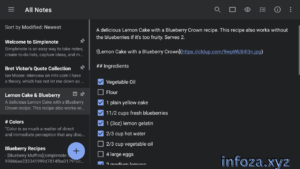
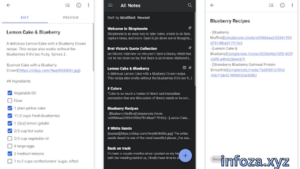
Simplenote એક એવી App છે જેમાં તમે ઝડપથી Notes બનાવી શકો છો, Ideas લખી શકો છો, To-Do Lists બનાવી શકો છો અને પછી જરૂર પડે ત્યારે Search કરીને તમારી માહિતી શોધી શકો છો. તેની ખાસ વાત એ છે કે Notes અલગ-અલગ Devices પર Sync થઈ શકે છે.
📋 Simplenote APKની મૂળભૂત માહિતી
| માહિતી | વિગત |
|---|---|
| App Name | Simplenote |
| Platform | Android, iOS, Windows, Mac, Linux, Web |
| Category | Productivity / Note Taking |
| Developer | Automattic, Inc. |
| મુખ્ય ઉપયોગ | Notes અને Ideas લખવા |
| To-Do List | Available |
| Tags | Available |
| Markdown | Available |
| Cloud Sync | Available |
| Note Sharing | Available |
| Passcode Lock | Available |
| Official Source | Google Play Store |
🌟 Simplenote APK શું છે?
Simplenote APK Android માટેની એક Simple Note Taking App છે. તેની મદદથી તમે તમારા Mobileમાં Notes બનાવી શકો છો અને તેમાં Text, Ideas, Lists અથવા બીજી Important Information લખી શકો છો.
Simplenoteનું મુખ્ય Focus simplicity પર છે. App Open કરો, Note લખો અને તમારું કામ પૂરું. Notesની સંખ્યા વધે ત્યારે Tags, Pins અને Instant Searchની મદદથી તેને સરળતાથી Organize કરી શકાય છે.
Simplenote તમારા Notesને Devices વચ્ચે Sync પણ કરે છે, જેથી તમે એક Device પર બનાવેલી Noteને બીજા Device પર પણ Access કરી શકો છો.
📱 Simplenoteનો પરિચય
Simplenote એક Lightweight અને Simple Note Taking App છે. તેનો ઉપયોગ Personal Notes, Study Notes, Ideas, Shopping Lists, To-Do Lists અને Daily Information માટે કરી શકાય છે.
ઉદાહરણ તરીકે, જો તમને કોઈ Important Idea અચાનક યાદ આવે તો તમે Simplenote Open કરીને તરત જ તેને લખી શકો છો. પછીથી તે Note Search કરીને ફરી વાંચી શકો છો.
Simplenoteમાં Notesને Tags સાથે Organize કરી શકાય છે અને Frequently Used Notesને Pin પણ કરી શકાય છે. Instant Search Feature તમને કોઈ ખાસ Keyword દ્વારા Note શોધવામાં મદદ કરે છે.
🛠️ Simplenote APKનો ઉપયોગ કેવી રીતે કરવો?
Simplenoteનો ઉપયોગ કરવો ખૂબ જ સરળ છે.
Step 1: તમારા Android Mobileમાં Official Simplenote App Install કરો.
Step 2: App Open કરીને Accountમાં Login કરો અથવા ઉપલબ્ધ વિકલ્પ પ્રમાણે Account બનાવો.
Step 3: New Note બનાવો.
Step 4: તેમાં તમારું Text, Idea અથવા List લખો.
Step 5: Noteને Organize કરવા માટે Tag Add કરો.
Step 6: Frequently Used Note હોય તો તેને Pin કરો.
Step 7: કોઈ જૂની Note શોધવી હોય તો Search Optionનો ઉપયોગ કરો.
Step 8: જરૂર પડે ત્યારે Noteને Share અથવા બીજા Device પર Access કરો.
Simplenote Notesને Automatically Sync કરે છે, એટલે અલગથી કોઈ Manual Sync Button દબાવવાની જરૂર પડતી નથી.
✨ Simplenoteની મુખ્ય સુવિધાઓ
📝 Simple Note Taking
Simplenoteનું સૌથી મોટું Feature તેનું Simple Note Taking Experience છે. તમે App Open કરીને તરત Note લખવાનું શરૂ કરી શકો છો.
☁️ Automatic Sync
તમારી Notes Android, iOS, Windows, Mac, Linux અને Web જેવા Supported Platforms વચ્ચે Sync થઈ શકે છે. તમે એક Device પર Note બનાવો અથવા Edit કરો તો તે બીજા Devices પર પણ Sync થઈ શકે છે.
🏷️ Tags સાથે Organization
ઘણી Notes થઈ જાય ત્યારે તેને શોધવી મુશ્કેલ બની શકે છે. Simplenoteમાં Tagsની મદદથી Notesને અલગ Categoriesમાં Organize કરી શકાય છે.
ઉદાહરણ તરીકે તમે Study, Work, Personal અથવા Ideas જેવા Tags બનાવી શકો છો.
🔍 Instant Search
Simplenoteમાં Search Featureની મદદથી તમે તમારી Notesમાંથી જરૂરી Information ઝડપથી શોધી શકો છો. Keyword Search ખાસ કરીને ત્યારે ઉપયોગી બને છે જ્યારે તમારી પાસે ઘણી Notes હોય.
📌 Pin Notes
જે Notesનો તમે વારંવાર ઉપયોગ કરો છો તેને Pin કરી શકાય છે. આથી Important Notesને સરળતાથી શોધી શકાય છે.
✅ To-Do Lists
Simplenoteનો ઉપયોગ માત્ર Normal Notes માટે જ નહીં પરંતુ To-Do Lists બનાવવા માટે પણ કરી શકાય છે. તમે Daily Tasks અથવા Shopping List જેવી વસ્તુઓ લખી શકો છો.
✍️ Markdown Support
Simplenote Markdownને Support કરે છે. તેની મદદથી Notesમાં Headings, Lists અને બીજી Basic Formatting કરી શકાય છે. Markdown Web, Android, iOS અને Desktop Appsમાં Supported છે.
🤝 Notes Share અને Collaborate
Simplenoteમાં Notes Share કરી શકાય છે અને કેટલાક ઉપયોગોમાં બીજા લોકો સાથે Collaboration પણ કરી શકાય છે. Notesને Web પર Publish કરીને Link દ્વારા Share કરવાનો વિકલ્પ પણ ઉપલબ્ધ છે.
🔒 Passcode Lock
તમારી Notesને વધારે Private રાખવા માટે Simplenoteમાં Passcode Lock Feature પણ ઉપલબ્ધ છે.
📌 Simplenoteનો અલગ અલગ કામ માટે ઉપયોગ
| કામ | Simplenote કેવી રીતે મદદ કરે છે |
|---|---|
| Study Notes | Studyની Important Information લખી શકાય |
| To-Do List | Daily Tasks લખી શકાય |
| Shopping List | Shopping માટેની વસ્તુઓ લખી શકાય |
| Ideas | નવા Ideas તરત Save કરી શકાય |
| Work | Office Notes અને Tasks રાખી શકાય |
| Writing | Articles અથવા Writing Ideas Store કરી શકાય |
| Personal Notes | Personal Information લખી શકાય |
| Planning | Daily અથવા Weekly Plans બનાવી શકાય |
| Quick Notes | કોઈપણ Idea ઝડપથી લખી શકાય |
| Collaboration | Notes Share કરીને સાથે કામ કરી શકાય |
✅ Simplenote APKના ફાયદા
- Notes બનાવવી ખૂબ સરળ છે.
- Interface Simple અને Easy છે.
- Notes અલગ Devices પર Sync કરી શકાય છે.
- Tagsની મદદથી Notes Organize કરી શકાય છે.
- Instant Search દ્વારા Notes શોધી શકાય છે.
- To-Do Lists બનાવી શકાય છે.
- Markdown Support ઉપલબ્ધ છે.
- Important Notesને Pin કરી શકાય છે.
- Notes Share કરી શકાય છે.
- Passcode Lock દ્વારા Notesને Protect કરી શકાય છે.
- Notes અને Sync Features Free ઉપલબ્ધ છે.
⚠️ Simplenote APKના નુકસાન
- App મુખ્યત્વે Text-based Notes માટે બનાવવામાં આવી છે.
- Notesમાં Direct Image અથવા File Attachment Upload કરી શકાતું નથી.
- Advanced Drawing અથવા Handwriting Features માટે આ App યોગ્ય નથી.
- Complex Project Management માટે અલગ Appની જરૂર પડી શકે છે.
- Account અને Syncનો ઉપયોગ કરવા માટે Internetની જરૂર પડી શકે છે.
- બહુ Advanced Formattingની જરૂર હોય તો બીજી Note Taking App વધુ યોગ્ય બની શકે છે.
💬 યુઝર્સના અનુભવો
Simplenote એવા Users માટે સારી પસંદગી બની શકે છે જેમને Simple અને Fast Note Taking App જોઈએ છે. Appમાં વધારે Complex Options ન હોવાથી તમે સીધા Notes લખવા પર Focus કરી શકો છો.
Students તેનો ઉપયોગ Study Notes અને To-Do Lists માટે કરી શકે છે. Writers Ideas અને Drafts Save કરી શકે છે. Office Users Daily Tasks અને Important Information રાખી શકે છે.
Tags અને Search Features ઘણી Notes હોય ત્યારે Useful બને છે, જ્યારે Automatic Sync અલગ Devices પર Notes Access કરવામાં મદદ કરે છે.
🔄 Simplenoteના વિકલ્પો
જો તમને Simplenote સિવાય બીજી Note Taking Apps અજમાવવી હોય તો નીચેના Options જોઈ શકો છો:
- Google Keep
- Microsoft OneNote
- Evernote
- Notion
- Standard Notes
દરેક Appના Features અલગ હોય છે. જો તમને Simple Text Notes જોઈએ તો Simplenote યોગ્ય બની શકે છે, જ્યારે Advanced Organization અથવા Multimedia Notes માટે બીજી Apps વધુ Features આપી શકે છે.
🔒 Simplenote APKની સુરક્ષા અને પ્રાઇવસી
Notesમાં ઘણી વખત Personal Information અથવા Important Ideas હોય છે, તેથી Account Security મહત્વપૂર્ણ છે.
Simplenoteની Google Play માહિતી પ્રમાણે Data in Transit Encrypted છે અને Users Data Delete કરવાની Request કરી શકે છે. App Passcode Lockની સુવિધા પણ આપે છે.
જો તમે Simplenote APK Install કરવા માંગતા હોવ તો Unknown અથવા Modified APK Websites પરથી File Download કરવાને બદલે Official Google Play Storeનો ઉપયોગ કરવો વધુ સારું છે.
તમારા Account માટે Strong Password રાખો અને Sensitive Notes Share કરતી વખતે સાવચેત રહો.
❓ Simplenote APK વિશે સામાન્ય પ્રશ્નો
Simplenote APK શું છે?
Simplenote APK Android માટેની Note Taking App છે, જેનો ઉપયોગ Notes, Ideas અને To-Do Lists બનાવવા માટે કરી શકાય છે.
શું Simplenote Android પર ચાલે છે?
હા, Simplenoteની Official Android App ઉપલબ્ધ છે અને તે Android Devices પર ઉપયોગ કરી શકાય છે.
શું Simplenote Free છે?
હા, Simplenote પોતાની Official Website પર Apps, Backups, Syncing અને Sharingને Free તરીકે રજૂ કરે છે.
શું Simplenote Notes Sync કરે છે?
હા, Simplenote Notesને Supported Devices અને Web App વચ્ચે Automatically Sync કરે છે.
શું Simplenoteમાં To-Do List બનાવી શકાય?
હા, Simplenoteમાં To-Do Lists બનાવી શકાય છે અને તેનો ઉપયોગ Daily Tasks માટે કરી શકાય છે.
શું Simplenoteમાં Markdown છે?
હા, Simplenote Markdown Support આપે છે અને Android સહિત અનેક Platforms પર Markdownનો ઉપયોગ કરી શકાય છે.
શું Simplenoteમાં Photos Add કરી શકાય?
Simplenoteમાં Note સાથે Direct Image અથવા File Attachment Upload કરી શકાતું નથી. જોકે Markdown દ્વારા Web પર Hosted Imageનું URL Embed કરી શકાય છે.
Simplenote APK ક્યાંથી Download કરવું?
Android Users માટે Simplenoteની Official App Google Play Store પરથી Download કરવી જોઈએ. Unofficial અથવા Modified APK Websites પરથી App Download કરવાનું ટાળવું સારું છે.
💡 Simplenoteનો ઉપયોગ કરવા માટે ઉપયોગી ટીપ્સ
- અલગ પ્રકારની Notes માટે અલગ Tags બનાવો.
- Important Notesને Pin કરો.
- Notes શોધવા માટે Specific Keywordsનો ઉપયોગ કરો.
- Daily Tasks માટે To-Do Lists બનાવો.
- Writing માટે Markdownનો ઉપયોગ કરો.
- Personal Notes માટે Passcode Lockનો ઉપયોગ કરો.
- Important Notesને સમયાંતરે Export કરીને Backup રાખો.
- Notes Share કરતી વખતે Privacyનું ધ્યાન રાખો.
- Account માટે Strong Password રાખો.
- App હંમેશા Official Source પરથી Install અને Update કરો.
Simplenote Android અને Desktop પરથી Notes Export કરવાની સુવિધા પણ આપે છે, જેથી તમે તમારી Notesનો Backup રાખી શકો છો.
🔗 Important Links
🌍 વધુ Apps અને Games માટે: Infoza.xyz
📱 Official Android App: Simplenote on Google Play Store
📝 અંતિમ વાત
Simplenote APK એક Simple અને Easy Note Taking App છે જેનો ઉપયોગ Notes, Ideas, To-Do Lists અને Daily Information લખવા માટે કરી શકાય છે.
Automatic Sync, Tags, Instant Search, Pin Notes, Markdown, Sharing અને Passcode Lock જેવી Features તેને રોજિંદા Note Taking માટે Useful બનાવે છે. ખાસ કરીને જે Usersને વધારે Complex Features વગર Simple અને Fast Note App જોઈએ છે તેમના માટે Simplenote એક સારું Option બની શકે છે.
જો તમે Mobile અને બીજા Devices પર તમારી Notesને સરળતાથી લખવા, Organize કરવા અને Access કરવા માંગો છો, તો Simplenote તમારા માટે ઉપયોગી App બની શકે છે.
નોંધ: Infoza.xyz Apps અને Games વિશે Information આપે છે. આ Website APK Files અથવા Modified APK Files Provide કરતી નથી. Official App માટે હંમેશા Official Sourceનો ઉપયોગ કરો.