
Feedly APK – News અને Articles વાંચવાની ઉપયોગી એપ
September 11, 2026
32.07 MB
90.0.53
Android 7.0+
5M+

Description
આજના સમયમાં Internet પર દરરોજ હજારો નવા articles, news અને information publish થાય છે. જો તમે અલગ અલગ websites અને blogsને manually check કરો તો ઘણો સમય લાગી શકે છે.
ક્યારેક technologyના updates જાણવા હોય છે, ક્યારેક business news વાંચવી હોય છે અને ક્યારેક કોઈ ખાસ topic વિશે નવા articles શોધવાના હોય છે.
આવા સમયે બધી favorite websitesને એક જ જગ્યાએ follow કરવા માટે એક news reader app ઉપયોગી બની શકે છે.
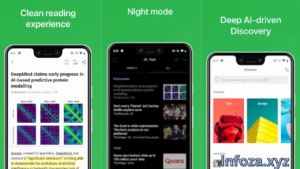
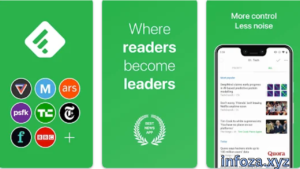
Feedly APK Android ફોનમાં Feedly appનો ઉપયોગ કરવા માટેની APK file તરીકે સમજવામાં આવી શકે છે. Feedly એક news reader અને content aggregation app છે. તેની મદદથી તમે newspapers, blogs, research journals, YouTube channels, podcasts, Reddit feeds અને Google News alerts જેવી વિવિધ sourcesને એક જગ્યાએ follow કરી શકો છો.
Feedlyમાં તમે તમારી પસંદગીના topics અને sourcesને organize કરી શકો છો અને નવા articles એક જ જગ્યાએ વાંચી શકો છો.
આ લેખમાં આપણે Feedly APK વિશે સરળ ગુજરાતી ભાષામાં જાણીશું.
📋 Feedly APKની મૂળભૂત માહિતી
| માહિતીવિગતો | |
|---|---|
| App Name | Feedly |
| Platform | Android |
| Category | News & Reading |
| Developer | Feedly Team |
| મુખ્ય ઉપયોગ | News, Articles અને Web Content વાંચવા |
| Sources | Websites, Blogs, News અને Research Journals |
| Podcasts | Podcasts અને YouTube channels follow કરી શકાય છે |
| RSS | RSS feeds follow કરી શકાય છે |
| Search | Articles અને sources શોધી શકાય છે |
| Account | Feedly account જરૂરી છે |
| Official Source | Google Play Store |
આ માહિતીથી તમને Feedly appને સમજવામાં સરળતા રહેશે. Feedlyમાં તમે તમારી પસંદગીના sourcesને એક જગ્યાએ ગોઠવી શકો છો અને નવા contentને સરળતાથી વાંચી શકો છો.
🌟 Feedly APK શું છે?
Feedly APK Android ફોનમાં Feedly app install કરવા માટે ઉપયોગમાં લેવાતી APK file તરીકે ઓળખી શકાય છે.
APKનો અર્થ Android Package Kit છે. Androidમાં apps install કરવા માટે APK fileનો ઉપયોગ થઈ શકે છે.
Feedlyનો મુખ્ય હેતુ અલગ અલગ websites અને content sourcesને એક જ જગ્યાએ લાવવાનો છે.
ઉદાહરણ તરીકે, જો તમને technology, sports અને businessના blogs પસંદ હોય તો તમે તે sourcesને Feedlyમાં follow કરી શકો છો. ત્યારબાદ નવા articlesને અલગ અલગ websites ખોલ્યા વગર Feedlyમાં જોઈ શકાય છે.
આથી Feedly એવા users માટે ઉપયોગી બની શકે છે જેઓ ઘણી websitesનું content regularly વાંચે છે.
📱 Feedlyનો પરિચય
Feedlyને એક smart news reader તરીકે સમજાવી શકાય છે. તે તમારી પસંદગીના sourcesમાંથી નવા articles અને updates એક જગ્યાએ બતાવવામાં મદદ કરે છે.
Feedlyમાં newspapers, industry publications, expert blogs અને research journals જેવા sources follow કરી શકાય છે. YouTube channels, podcasts, Reddit feeds અને Google News alertsને પણ organize કરી શકાય છે.
આ app ખાસ કરીને students, bloggers, researchers, professionals અને news અથવા industry updates regularly વાંચતા users માટે ઉપયોગી બની શકે છે.
🛠️ Feedly APKનો ઉપયોગ કેવી રીતે કરવો?
Feedlyનો ઉપયોગ કરવો ખૂબ મુશ્કેલ નથી.
સૌથી પહેલા Android ફોનમાં Feedlyની official app install કરો. ત્યારબાદ app open કરીને Feedly accountમાં sign in અથવા sign up કરો. Google Play listing મુજબ appનો ઉપયોગ કરવા માટે Feedly account જરૂરી છે.
હવે તમે તમારી પસંદગીના topics અથવા websites શોધી શકો છો.
કોઈ website અથવા source પસંદ કર્યા પછી તેને Feedlyમાં follow કરી શકાય છે. ત્યારબાદ તે sourceના નવા articles તમારા feedમાં દેખાઈ શકે છે.
તમે અલગ અલગ topics માટે folders અથવા feeds બનાવી શકો છો. જેમ કે Technology, Business, Sports અથવા SEO.
આ રીતે તમારી પસંદગીના contentને અલગ અલગ categoriesમાં ગોઠવી શકાય છે.
✨ Feedlyની મુખ્ય સુવિધાઓ
Feedlyમાં ઘણા ઉપયોગી features છે.
📰 News અને Articles વાંચવા
Feedlyમાં વિવિધ news websites અને publicationsમાંથી નવા articles એક જગ્યાએ વાંચી શકાય છે.
🌐 Websites Follow કરવી
તમારી પસંદગીની websites અને blogsને follow કરીને તેમના નવા updates એક જગ્યાએ જોઈ શકાય છે.
📚 Research Sources
Expert blogs, industry publications અને research journals જેવા sourcesને follow કરી શકાય છે.
🎧 Podcasts અને YouTube
Feedlyમાં YouTube channels અને podcasts જેવા content sources પણ organize કરી શકાય છે.
🔎 Article Search
તમારા feedsમાં જરૂરી articles શોધવા માટે search features ઉપલબ્ધ છે. કેટલાક advanced search features paid plansમાં મળી શકે છે.
📌 Articles Save કરવી
ગમતા articlesને પછી વાંચવા માટે save કરી શકાય છે. Feedlyમાં articlesને Boardsમાં પણ save કરી શકાય છે.
📝 Notes અને Highlights
Paid plansમાં saved articles પર notes અને highlights ઉમેરવાની સુવિધા ઉપલબ્ધ છે.
📌 Feedlyનો અલગ અલગ કામ માટે ઉપયોગ
Feedlyનો ઉપયોગ માત્ર news વાંચવા માટે જ કરવો જરૂરી નથી.
| ઉપયોગ | Feedlyમાં શું કરી શકાય? |
|---|---|
| 📚 અભ્યાસ | Research articles અને educational sources follow કરવા |
| 💼 Business | Industry અને business updates વાંચવા |
| 💻 Technology | Tech websites અને blogs follow કરવા |
| 🔍 Research | વિવિધ research sources એક જગ્યાએ રાખવા |
| ✍️ Blogging | નવા topics અને industry updates શોધવા |
| 📈 SEO | SEO અને digital marketing blogs follow કરવા |
| 📰 News | Favorite news sources એક જગ્યાએ વાંચવા |
આ રીતે Feedlyને information અને content research માટે પણ ઉપયોગ કરી શકાય છે.
✅ Feedly APKના ફાયદા
Feedlyના ઘણા ફાયદા છે:
- ઘણી websitesને એક જગ્યાએ follow કરી શકાય છે.
- News અને articles વાંચવામાં સરળતા રહે છે.
- Blogs અને research sources organize કરી શકાય છે.
- YouTube channels અને podcasts follow કરી શકાય છે.
- Reddit feeds અને Google News alerts પણ add કરી શકાય છે.
- Favorite sourcesને અલગ અલગ categoriesમાં ગોઠવી શકાય છે.
- ગમતા articlesને save કરી શકાય છે.
- Articlesને પછીથી વાંચવા માટે રાખી શકાય છે.
- Content શોધવા માટે search features ઉપલબ્ધ છે.
- Mobileમાં news reading experience સરળ બને છે.
- Professionals માટે industry updates track કરવામાં મદદ મળી શકે છે.
⚠️ Feedly APKના નુકસાન
Feedly ઉપયોગી છે, પરંતુ તેમાં કેટલીક મર્યાદાઓ પણ હોઈ શકે છે.
- Feedlyનો ઉપયોગ કરવા માટે account જરૂરી છે.
- નવા userને શરૂઆતમાં feeds અને sources ગોઠવવામાં સમય લાગી શકે છે.
- કેટલાક advanced features paid plansમાં ઉપલબ્ધ છે.
- ખૂબ વધારે sources follow કરવાથી information overload થઈ શકે છે.
- કેટલાક content માટે original website ખોલવાની જરૂર પડી શકે છે.
- Internet connection વગર નવા online updates મેળવવામાં મુશ્કેલી થઈ શકે છે.
- અજાણી website પરથી APK મેળવવી સુરક્ષિત ન પણ હોય.
💬 યુઝર્સના અનુભવો
Feedlyનો ઉપયોગ અલગ અલગ લોકો પોતાની જરૂરિયાત પ્રમાણે કરે છે. કેટલાક users તેનો ઉપયોગ માત્ર news વાંચવા માટે કરે છે, જ્યારે બીજા users technology, business, research અથવા industry updates માટે તેનો ઉપયોગ કરે છે.
જો તમે ઘણી websites regularly વાંચતા હોવ તો Feedlyમાં તે sourcesને એક જગ્યાએ રાખવાથી સમય બચાવવામાં મદદ મળી શકે છે.
નવા userને શરૂઆતમાં ઘણી websites અને categories જોઈને થોડું confusion થઈ શકે છે. પરંતુ થોડા મહત્વના sourcesથી શરૂઆત કરવામાં Feedly સમજવું સરળ બની શકે છે.
આથી Feedlyનો અનુભવ દરેક વ્યક્તિની reading habits અને પસંદગીના sources પર આધાર રાખે છે.
🔄 Feedlyના વિકલ્પો
જો તમે Feedlyનો ઉપયોગ કરવા માંગતા ન હોવ તો news અને RSS reading માટે બીજી apps પણ ઉપલબ્ધ છે.
Google News વિવિધ news sourcesમાંથી news વાંચવા માટે સરળ option છે.
Inoreader RSS feeds અને online content organize કરવા માટે ઉપયોગ કરી શકાય છે.
NewsBlur પણ RSS અને news reading માટે ઉપયોગી option છે.
Flipboard news અને articlesને magazine જેવી styleમાં વાંચવા માટે લોકપ્રિય છે.
જો તમને ઘણા websites અને blogsને એક જગ્યાએ follow કરવા હોય તો Feedly એક ઉપયોગી option બની શકે છે.
🔒 Feedly APKની સુરક્ષા અને પ્રાઇવસી
Feedly APK install કરતી વખતે તેનો source ખૂબ મહત્વનો છે.
Internet પર ઘણી websites APK files આપે છે, પરંતુ દરેક website વિશ્વસનીય હોય તે જરૂરી નથી. કેટલીક અજાણી APK fileમાં unwanted અથવા harmful software હોઈ શકે છે.
તેથી Feedlyની official Android app માટે Google Play Store જેવા trusted sourceનો ઉપયોગ કરવો વધુ સારું છે. Google Play listing મુજબ Feedly appમાં ads અને in-app purchases પણ છે.
Feedly privacyને પણ મહત્વ આપે છે અને પોતાની website પર privacy by default વિશે માહિતી આપે છે.
Google Playની current data safety information મુજબ app personal information અને app activity જેવી data categories collect કરી શકે છે, data transit દરમિયાન encrypted છે અને users data deletionની request કરી શકે છે.
કોઈપણ app install કરતી વખતે permissions અને privacy information ધ્યાનથી તપાસવી સારી છે.
❓ Feedly APK વિશે સામાન્ય પ્રશ્નો
Feedly APK શું છે?
Feedly APK Android ફોનમાં Feedly app install કરવા માટે ઉપયોગમાં લેવાતી APK fileને કહી શકાય છે.
Feedlyનો ઉપયોગ શેના માટે થાય છે?
Feedlyનો ઉપયોગ news, blogs, websites, research journals, podcasts અને બીજા online content sourcesને એક જગ્યાએ follow અને વાંચવા માટે થઈ શકે છે.
શું Feedly Androidમાં ચાલે છે?
હા, Feedlyની Android app Google Play Store પર ઉપલબ્ધ છે.
શું Feedly માત્ર news માટે છે?
ના. Feedlyમાં news ઉપરાંત blogs, industry publications, research journals, YouTube channels, podcasts, Reddit feeds અને Google News alerts જેવા sources પણ follow કરી શકાય છે.
શું Feedly મફત છે?
Feedlyમાં Free plan ઉપલબ્ધ છે, જ્યારે Pro, Pro+ અને Enterprise જેવા paid plansમાં વધારાના features મળી શકે છે.
શું Feedly APK સુરક્ષિત છે?
Official Google Play Store પરથી Feedly app મેળવવી વધુ સારી પસંદગી છે. અજાણી website પરથી APK download કરવાથી security risk થઈ શકે છે.
શું વિદ્યાર્થીઓ Feedlyનો ઉપયોગ કરી શકે છે?
હા. વિદ્યાર્થીઓ educational blogs, research journals અને અન્ય useful information sources follow કરવા માટે Feedlyનો ઉપયોગ કરી શકે છે.
💡 Feedlyનો ઉપયોગ કરવા માટે ઉપયોગી ટીપ્સ
જો તમે પહેલી વાર Feedlyનો ઉપયોગ કરો છો તો એકસાથે બહુ બધા sources follow કરવાની જરૂર નથી.
પહેલા તમારા માટે મહત્વના થોડા sources પસંદ કરો અને તેમને અલગ અલગ categoriesમાં ગોઠવો.
ઉદાહરણ તરીકે, technology માટે એક feed, business માટે બીજો અને study માટે ત્રીજો feed બનાવી શકાય છે.
જો કોઈ article મહત્વનો લાગે તો તેને save કરીને પછી વાંચી શકાય છે.
ખૂબ વધારે websites follow કરવાથી feedમાં ઘણા articles આવી શકે છે, તેથી માત્ર useful અને trusted sources પસંદ કરવાનું વધુ સારું છે.
APK install કરતી વખતે હંમેશા trusted sourceને પસંદ કરો અને અજાણી APK files સાથે સાવચેત રહો.
🔗 Important Links
🌍 વધુ apps અને games માટે: Infoza.xyz
📱 Feedlyની official Android app માટે: Feedly on Google Play Store
📝 અંતિમ વાત
Feedly એક ઉપયોગી news reader અને content organization app છે. તેની મદદથી તમે news websites, blogs, research journals, YouTube channels, podcasts અને બીજા online sourcesને એક જગ્યાએ follow કરી શકો છો.
Feedly APK Androidમાં Feedly app install કરવાનો એક રસ્તો હોઈ શકે છે. પરંતુ APK file મેળવતી વખતે trusted અને official sourceને પ્રાથમિકતા આપવી વધુ સારી છે.
જો તમે દરરોજ ઘણી websites અને blogsમાંથી નવી માહિતી વાંચતા હોવ અને બધું એક જ જગ્યાએ ગોઠવવા માંગતા હોવ તો Feedly તમારા માટે એક ઉપયોગી app બની શકે છે.