
Otter.ai APK – AI સાથે Voice અને Meeting Notes બનાવવાની ઉપયોગી App
September 3, 2026
24.12 MB
3.107.0-7150
Android 6.0+
1M+

Description
આજના સમયમાં લોકો દરરોજ ઘણી meetings, lectures, interviews અને online callsમાં ભાગ લે છે. આવી સ્થિતિમાં દરેક વાતને હાથથી લખવી મુશ્કેલ બની શકે છે. Otter.ai APK એવી ઉપયોગી AI app છે જે વાતચીતને record કરીને તેને textમાં convert કરવામાં મદદ કરે છે.
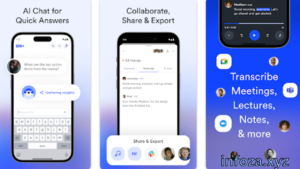
Otter.ai Android, iOS અને Web પર ઉપલબ્ધ છે. Android app દ્વારા તમે audio record કરી શકો છો, live transcription જોઈ શકો છો અને meetingના મહત્વના pointsને સરળતાથી સમજી શકો છો.
નોંધ: Infoza.xyz કોઈ APK અથવા modified APK file આપતું નથી. અહીં માત્ર app વિશે માહિતી આપવામાં આવે છે. App માટે official sourceનો ઉપયોગ કરવો વધુ સુરક્ષિત છે.
📋 Otter.ai APKની મૂળભૂત માહિતી
| માહિતી | વિગતો |
|---|---|
| App Name | OtterAI Transcribe Voice Notes |
| Developer | Otter.ai |
| Platform | Android, iOS, Web |
| Category | Productivity |
| મુખ્ય ઉપયોગ | Voice Recording અને AI Transcription |
| મુખ્ય Feature | Real-time Transcription |
| AI Features | AI Notes, Summary અને Chat |
| Online Meetings | Zoom, Google Meet, Microsoft Teams |
| Account | જરૂરી |
| Android Support | Android 5.0 અથવા ઉપર |
| Official Source | Google Play Store / Otter.ai |
Otterની Android app માટે Android 5.0 અથવા તેના પછીનું version જરૂરી છે. Google Play listing મુજબ appના 5M+ downloads છે અને તેમાં in-app purchases પણ ઉપલબ્ધ છે.
🌟 Otter.ai APK શું છે?
Otter.ai APK મૂળભૂત રીતે AI-powered voice અને meeting assistant app છે. તે તમારી meeting અથવા conversationને સાંભળીને તેને લખાણમાં બદલવામાં મદદ કરે છે.
જો તમે લાંબી meetingમાં દરેક વાત લખી શકતા નથી, તો Otter તમારા માટે useful બની શકે છે. તે transcript બનાવે છે અને મહત્વના pointsને શોધવામાં પણ મદદ કરે છે.
📱 Otter.aiનો પરિચય
Otter.ai ખાસ કરીને students, teachers, business teams, journalists, interviewers અને professionals માટે ઉપયોગી બની શકે છે.
તમે તેનો ઉપયોગ face-to-face conversation માટે કરી શકો છો અથવા Zoom, Google Meet અને Microsoft Teams જેવી online meetings સાથે પણ તેનો ઉપયોગ કરી શકો છો. Otterનું Meeting Agent meetingમાં જોડાઈને audio record, transcription, summary અને action itemsમાં મદદ કરી શકે છે.
🛠️ Otter.ai APKનો ઉપયોગ કેવી રીતે કરવો?
Step 1: App Install કરો
તમારા Android phoneમાં Otterની official app install કરો.
Step 2: Account બનાવો
App open કર્યા પછી accountમાં sign in અથવા sign up કરો.
Step 3: Recording શરૂ કરો
Meeting અથવા conversation દરમિયાન recording શરૂ કરી શકાય છે.
Step 4: Live Transcript જુઓ
Otter તમારી વાતચીતને real-timeમાં textમાં બદલવામાં મદદ કરે છે.
Step 5: Summary જુઓ
Meeting પછી AI દ્વારા તૈયાર થયેલા summary અને important points જોઈ શકાય છે.
Step 6: Notes Share કરો
Transcript અથવા notesને અન્ય લોકો સાથે share કરી શકાય છે અને જરૂરી હોય તો export પણ કરી શકાય છે.
✨ Otter.aiની મુખ્ય સુવિધાઓ
🎙️ Voice Recording
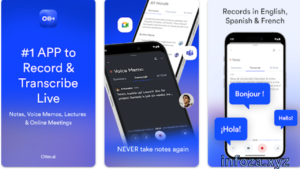
Otterમાં તમે તમારા phone પરથી audio record કરી શકો છો. આ feature lectures, interviews અને meetings માટે ઉપયોગી છે.
📝 Real-Time Transcription
App recording દરમિયાન બોલાયેલા શબ્દોને textમાં બદલવામાં મદદ કરે છે. આ કારણે meeting દરમિયાન અલગથી notes લખવાની જરૂર ઓછી થઈ શકે છે.
🤖 AI Meeting Notes
Otter AI meetingના મુખ્ય pointsને સમજવામાં અને notes તૈયાર કરવામાં મદદ કરે છે.
📌 Automatic Summaries
લાંબી meeting પૂરી થયા પછી તેનો summary મેળવવામાં મદદ મળે છે. તેમાં important takeaways અને action items પણ મળી શકે છે.
👥 Speaker Identification
Otter speakersને ઓળખીને transcriptમાં અલગ અલગ speakersને label કરવામાં મદદ કરી શકે છે.
🔎 Searchable Notes
તમારા transcriptsમાં કોઈ ખાસ શબ્દ અથવા information શોધી શકાય છે. આ feature લાંબી meetings માટે ખૂબ ઉપયોગી બની શકે છે.
📂 Audio અને Video Import
Otterમાં પહેલાથી રહેલી audio અને video files પણ import કરીને transcription કરી શકાય છે.
📤 Export Options
Transcriptને TXT, DOCX, PDF અને SRT જેવા formatsમાં export કરી શકાય છે, જ્યારે audioને MP3 તરીકે export કરવાની સુવિધા પણ ઉપલબ્ધ છે.
📌 Otter.aiનો અલગ અલગ કામ માટે ઉપયોગ
| ઉપયોગ | Otter.ai કેવી રીતે મદદ કરે છે |
|---|---|
| 🎓 Students | Lecture notes બનાવવામાં |
| 💼 Business | Meeting notes અને action items |
| 🎤 Interviews | Interview transcript બનાવવા |
| 🎙️ Podcasts | Audioને textમાં બદલવામાં |
| 💻 Online Meetings | Zoom અને Google Meet notes |
| 📚 Research | Recorded information search કરવામાં |
| 📰 Media | Interviews અને conversations record કરવામાં |
| ♿ Accessibility | Live captionsમાં મદદ |
✅ Otter.ai APKના ફાયદા
- AI દ્વારા automatic transcription
- Real-time text conversion
- Meeting summaries બનાવવામાં મદદ
- Speaker identification
- Audio અને video import
- Transcript search કરી શકાય છે
- Notes share કરી શકાય છે
- PDF, TXT, DOCX અને SRT export options
- Zoom, Google Meet અને Microsoft Teams સાથે ઉપયોગ
- Android, iOS અને Web પર ઉપલબ્ધ
⚠️ Otter.ai APKના નુકસાન
- Transcription માટે internet connectionની જરૂર પડી શકે છે.
- Account બનાવવું જરૂરી છે.
- કેટલીક advanced features paid plansમાં available હોઈ શકે છે.
- AI transcriptionમાં ક્યારેક ભૂલો થઈ શકે છે.
- Recording કરતી વખતે privacy અને permissionનું ધ્યાન રાખવું જરૂરી છે.
ખાસ કરીને phone calls માટે Otter હાલમાં third-party appsને સીધી call recording કરવાની પરવાનગી મળતી ન હોવાથી recorded call file import કરીને transcription કરવાની રીત બતાવે છે. Call recording કરતી વખતે સ્થાનિક કાયદા અને participantsની permissionનું ધ્યાન રાખવું જોઈએ.
💬 યુઝર્સના અનુભવો
ઘણા users માટે Otterનું સૌથી ઉપયોગી feature automatic transcription છે. Meeting અથવા lecture દરમિયાન દરેક sentence લખવાની જરૂર રહેતી નથી.
પરંતુ transcriptionની accuracy audio quality, speaker અને ભાષા જેવા factors પર આધાર રાખી શકે છે. તેથી important information હોય ત્યારે transcriptને એકવાર check કરવો સારો વિચાર છે.
🔄 Otter.aiના વિકલ્પો
જો તમને voice transcription અથવા AI meeting notes માટે બીજી apps અજમાવવી હોય તો તમે Google Recorder, Notta, Fireflies.ai અને Microsoft OneNote જેવા વિકલ્પો પણ જોઈ શકો છો.
દરેક appના features અને pricing અલગ હોઈ શકે છે, તેથી તમારી જરૂરિયાત પ્રમાણે પસંદ કરવી યોગ્ય છે.
🔒 Otter.ai APKની સુરક્ષા અને પ્રાઇવસી
Voice recordings અને meeting transcriptsમાં ઘણી વખત private information હોઈ શકે છે. તેથી કોઈપણ recording કરતા પહેલાં સામેની વ્યક્તિની permission અને applicable rulesનું ધ્યાન રાખવું જોઈએ.
Otterની official information મુજબ appમાં account અને cloud-based servicesનો ઉપયોગ થાય છે. Google Play listingમાં developer privacy અને data handling સંબંધિત માહિતી પણ આપવામાં આવે છે.
❓ Otter.ai APK વિશે સામાન્ય પ્રશ્નો
Otter.ai APK શું કામ આવે છે?
Otter.ai મુખ્યત્વે audio recording, transcription, meeting notes અને AI summaries માટે ઉપયોગી app છે.
શું Otter.ai Android પર ચાલે છે?
હા, Otterની official Android app ઉપલબ્ધ છે.
શું Otter.ai meeting record કરી શકે છે?
હા, Otter in-person અને online meetings માટે recording અને transcription features આપે છે.
શું Otter.ai Zoom સાથે કામ કરે છે?
હા, Otter Zoom meetings સાથે transcription અને AI meeting notes માટે ઉપયોગ કરી શકાય છે.
શું Otter.ai Google Meet સાથે કામ કરે છે?
હા, Otter Google Meet અને Microsoft Teams જેવી services સાથે પણ કામ કરી શકે છે.
શું Otter.ai free છે?
Otter Basic માટે free plan ઉપલબ્ધ છે, જ્યારે વધુ features અને વધારે transcription limits માટે paid plans પણ ઉપલબ્ધ છે.
શું Otter.ai audio fileને textમાં બદલી શકે છે?
હા, audio અને video files import કરીને તેને transcribe કરી શકાય છે.
શું Otter.ai phone calls સીધી record કરે છે?
હાલમાં Otter phone callsને સીધી third-party recording તરીકે record કરતું નથી; recorded call fileને Otterમાં import કરીને transcription કરી શકાય છે.
💡 Otter.aiનો ઉપયોગ કરવા માટે ઉપયોગી ટીપ્સ
- Recording પહેલાં microphone યોગ્ય રીતે કામ કરે છે કે નહીં તે check કરો.
- Meetingમાં speakers પાસે clear audio રહે તેનું ધ્યાન રાખો.
- Important transcriptને manually review કરો.
- Private conversation record કરતા પહેલાં permission લો.
- Long meetings માટે summary અને highlightsનો ઉપયોગ કરો.
- જરૂરી transcriptsને export કરીને અલગ જગ્યાએ save કરો.
- APK અથવા modified APK માટે અજાણી websitesનો ઉપયોગ કરવાને બદલે official source પસંદ કરો.
🔗 Important Links
🌍 વધુ Apps અને Games માટે: Infoza.xyz
📱 Official Android App: OtterAI Transcribe Voice Notes – Google Play Store
📝 અંતિમ વાત
Otter.ai APK એવા users માટે ઉપયોગી app બની શકે છે જેઓ meetings, lectures, interviews અથવા conversationsને record કરીને textમાં બદલવા માંગે છે. તેની real-time transcription, AI summaries, speaker identification, searchable notes અને export જેવી સુવિધાઓ તેને એક useful productivity tool બનાવે છે.
જો તમે Otter.aiનો ઉપયોગ કરવા માંગતા હોવ તો official Google Play Store અથવા official Otter.ai sourceનો ઉપયોગ કરવો વધુ યોગ્ય છે. Infoza.xyz માત્ર apps અને games વિશે માહિતી આપે છે અને કોઈ APK અથવા modified APK file provide કરતું નથી.